We make a pain tracker, so you should read a comparison from us with that in mind. We have tried to write the one we would want to read: what each app is good at, who it suits, and where ours is the wrong choice. The apps here are the ones people in chronic pain communities recommend most often. The details come from each app's own store page and website in November 2026; check them before you decide, because apps change.
First, what matters
In long threads about pain trackers, one piece of advice comes up again and again: the best app is the one you keep using. People give up trackers that feel like homework, and one person described leaving an app because it had too much in it. So before comparing features, ask one question of every app: can I make an entry on my worst day?
Guava
Good at: breadth. Guava tracks symptoms and pain with a body map, medicines with reminders and refill alerts, and many other health factors, and it can bring your medical records into one place. It runs on iPhone, iPad and Android, and has a free plan and a paid one.
Suits: people with several conditions who want symptoms, records and lab results together and do not mind a larger app.
Bearable
Good at: flexibility. You can add your own symptoms and your own daily factors, such as sleep, food or mood, and the paid plan shows how they move together. Its makers say that tracking of your own symptoms and factors is not limited on the free plan.
Suits: people who want to see how many parts of daily life go along with their symptoms and are willing to check in every day.
PainScale
Good at: a classic pain diary. PainScale logs strength, triggers, symptoms, treatments, medicines, activity, mood and sleep, has a body map, and builds reports to share with a doctor. It is free and also offers articles about pain.
Suits: people who want a free pain log with reports. Look at when it was last updated before you start.
Pain Tracker, the Family Health app
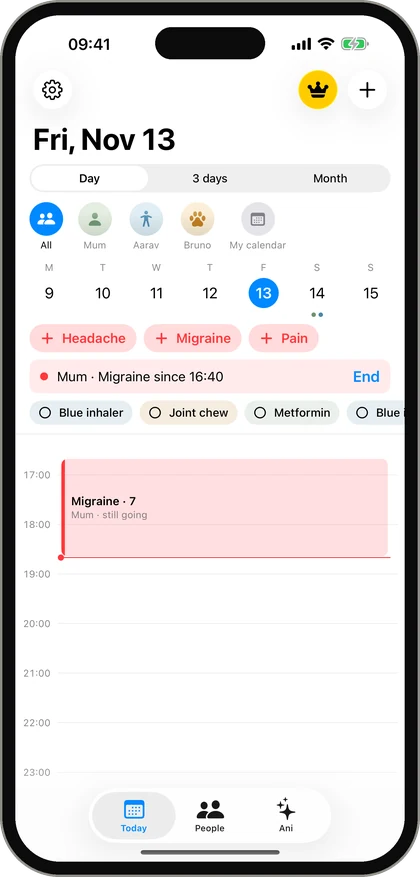
Good at: speed, and families. One tap starts a headache, migraine or pain entry and another ends it, from an iPhone or an Apple Watch. Each family member has their own journal, so a parent can keep the record for a child or for their own mother or father. The doctor summary puts 7 days, 30 days or 3 months on one page.
Not good at: breadth. There is no food diary, no period tracker and no import of medical records. It runs on iPhone, iPad and Apple Watch only, so it is not for Android, and it is in English only.
Suits: people who mainly want to record headaches, migraines or pain with little effort, and families who look after someone.
Coming in version 2.0. The screens below are from version 2.0, which is on its way to the App Store. Update the app once it appears.
Pen and paper
Paper belongs in this list. Several people in those threads went back to it and were happier. It costs nothing and never asks for an update. Its weak point is counting days and averages before an appointment. More on this in pain journal: app or paper?
How to choose
- Try two for a week each. Not five. Use them on real days, including a bad one.
- Time one entry. If it takes more than a few seconds on a bad day, it will not last.
- Look at what comes back. After a week, can the app show you something you can use at an appointment?
- Check that you can get your data out. A report or an export means you are not locked in.
- Check who it is for. If you keep the record for someone else, make sure the app allows more than one person.
Whichever you choose, start small. How to keep a pain diary you will actually keep explains which three things to record first.
Guava, Bearable and PainScale are trademarks of their owners. We are not connected with them.
Questions people ask
What is the best app for tracking chronic pain?
There is no single best one. Guava and Bearable are the two most often recommended in chronic pain communities. The best choice is the one you are still using after a month, so try two and keep the one that is quickest on a bad day.
Is there a free pain tracker app?
Yes. PainScale is free. Guava, Bearable and Pain Tracker are free to download and have a paid plan for extra features. Check each app's store page for what is included.
Which pain tracker app works on an Apple Watch?
Pain Tracker lets you start a headache, migraine or pain entry from an Apple Watch and set the strength with the Digital Crown. Check the store pages of the other apps for their current watch support.
Can I track pain for my child or parent in one app?
Pain Tracker is built for that: each family member has their own journal in one account. Most other trackers are made for one person.
This article is general information about keeping a record. It is not medical advice and does not replace your doctor. If your pain is new, sudden, severe or changing, see a doctor; in an emergency call your local emergency number.